Create-TestVMs
Documentation for the Create-TestVMs PowerShell script available in the PowerShell Gallery.
This script was created to help automate the creation of Hyper-V VMs for Windows Autopilot testing. However, the script will create Hyper-V VMs for any purpose you need. Run the script with administrative privileges on your Hyper-V host machine.
What it does
When the script is run, it will prompt you for the VM settings necessary to create a Hyper-V VM. It will then create, and start, as many VMs as you ask for using the provided naming prefix to begin the VM name. If you do not change the default values at the top of the script, it will create and start a VM named Autopilot-999, where 999 is a three digit random number, with 2GB of RAM and the VM config files and hard disks stored in the Hyper-V default locations.
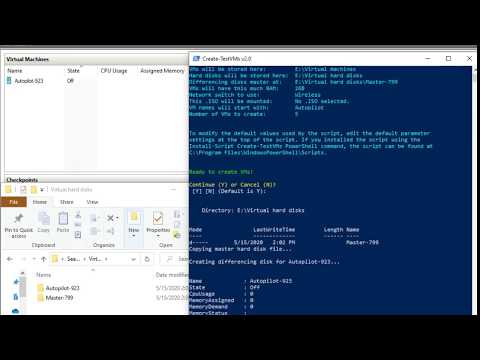
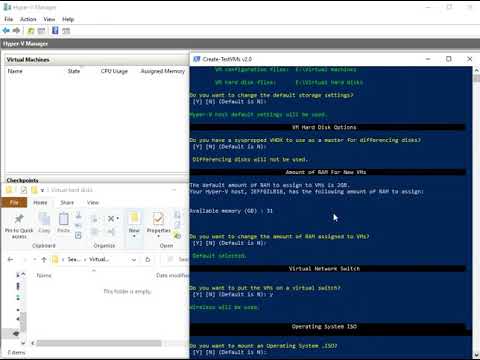
When creating VMs, you can create each with their own full VHDX file and boot from an operating system ISO to install Windows, or choose to create VMs using differencing disks by selecting a master, sysprepped Windows image. You can accept or modify the default values when prompted as the script runs for other options. All questions have default values if you just hit enter. To modify the default values used by the script, edit the default parameter settings at the top of the script. If you installed the script using the Install-Script Create-TestVMs PowerShell command, the script can be found at $env:ProgramFiles\WindowsPowerShell\Scripts.
Here’s what it looks like to build 5 VMs using differencing disks in about 2:30:
Individual VMs booting from an ISO is even faster. About a minute:
Feedback or suggestions for improvements? Find me on Twitter @jeffgilb.
The current version of the script is 2.3.
Get it from the PowerShell Gallery by running the Install-Script Create-TestVMs command.
Release notes
Version 1
- v1.0
- Initial release
- v1.1
- Minor bug fixes
- v1.2
- Minor bug fixes
- v1.3
- Minor bug fixes
Version 2
- Version 2.0
- Added version to PowerShell console title.
Added capability to accept or change Hyper-V host save locations.
Set file and folder browse dialogs to always open on top.
Added final summary confirmation prompt before creating VMs with options to exit.
Added a virtual network configuration selector dialog. No virtual network selected by default.
Added differencing disk support:
- Allows selection of a master (sysprepped) VHDX to be used as the master disk for new VMs
- Creates an OOBE snapshot while turned off for VMs using differencing disks
- Creates a master directory with a copy of the selected VHDX.
- Creates a readme file in the master disk directory listing VMs using the master disk
- Puts the master VHDX and SN in the VM notes in Hyper-V - Version 2.1
- Bug fix to address concatonating paths and virtual network names.
- Version 2.2
- Fixed network switch assignment issue.
- Version 2.2
- Fixed location for non-differencing disk hard disk files to be stored.